


TaleWave
3.078.00 Reviews
App Specs
- Version
- 1.1.26
- Updated On
- License
- Free
- Downloads
- 10,000+
- Developer
- TaleWave
- Categories
- Books & Reference
- Platform
- Android
Screenshots
 Analysis by AppCompare
I approach TaleWave as a pocket reading option for the moments when I want a story that asks me to make decisions, rather than a conventional book I simply move through from page to page. That distinction matters: its appeal is not just having fiction on a phone, but being able to steer a narrative and later see where another choice leads. TaleWave is a free Books & Reference app from TaleWave, aimed at Teen readers. It may suit someone looking for a low-commitment way to explore interactive fiction, although in-app purchases range from $0.49 to $279.99 per item, so I would check any purchase prompt carefully before paying.
A practical way to settle into a story
My preferred way to use an interactive reading app is to browse first, choose a story that fits the time I have, and then read without rushing decisions. TaleWave’s descriptions and genre browsing help with that first choice. For a short break, I would pick a premise that sounds easy to enter; for a longer evening, I would choose something whose setup makes me curious enough to stay with the branching plot. That small bit of planning makes the experience feel less like aimless scrolling and more like sitting down with a book.
Choices are most satisfying when I make them in character rather than hunting for an imagined “best” route. If a story presents a difficult decision, I try to respond as the character would, then revisit it later with a different instinct. That gives the branching structure a purpose: the replay becomes a way to explore the story, not merely to correct a supposed mistake. I would also pause at a choice if I am reading while distracted. Missing the context can make a consequence feel arbitrary, even when the point is to see how the plot reacts.
Settings that make phone reading easier
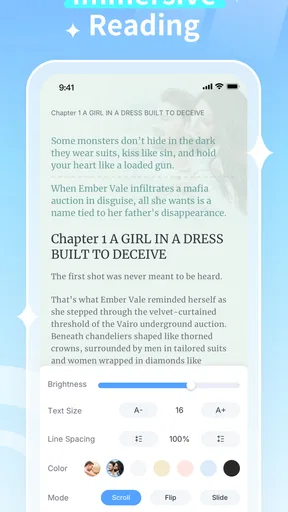
The font controls, day and night modes, and background options are useful because a phone is not always a comfortable place to read. I would set the text size before getting invested in a chapter, rather than repeatedly changing it once the story has momentum. A comfortable size can reduce squinting, while a background with enough contrast keeps the words clear. Night mode is an obvious choice in a dim room, but I would still check that the text remains easy to distinguish instead of assuming the darkest setting is best.
These options are practical adjustments, not a substitute for a dedicated e-reader. If I expect to read for a long stretch, I would also consider screen brightness and take breaks; interface customization cannot remove the fatigue of staring at a phone. The useful habit is to make one quick setup pass at the beginning of a session, then leave the display alone unless the lighting changes. That keeps attention on the narrative rather than turning every reading session into a settings exercise.
Repeatable habits for exploring branches
When I want to see another outcome, I would treat a replay as a separate reading session and remember the choice I am deliberately changing. That simple approach makes comparisons clearer: if I change several decisions at once, it becomes harder to tell which one led to a different turn. I would avoid trying to map every possible branch in one sitting, too. Exploring at a natural pace preserves some surprise and makes the story feel like fiction instead of a checklist.
TaleWave also works well as a small routine: browse when I have a spare moment, save the actual reading for a quieter break, and return when I can follow the plot. That is especially helpful for readers who are used to picking up a novel in short bursts. Still, if I need a dependable offline book for commuting, or want a library organized around a particular author or title, I would compare it with conventional ebook apps before settling on it. Interactive fiction and standard ebooks solve different reading needs.
Worth Reading Before You Choose

Baby Panda World Brings Quick Play to Modern Phones, but Its Game Library Feels Busy

ESPN’s Live Game View Makes Following Close Games Easier

QuizzLand Review: A Good Fit for Short Trivia Breaks, Not Every Player

Basketball Stars: Multiplayer Is Fast, but Can It Recover When Matches Go Wrong?

WEBTOON Turns Phone Updates Into a Better Reading Routine

Link to Windows Runs on Shared Habits, Not Social Feeds
Where expectations should stay grounded
I would not assume that every story offers the same depth of branching or that every reader-submitted piece will match the polish of a professionally edited novel. A community library can bring variety, but it can also mean uneven writing, pacing, and presentation. I would use the synopsis to decide whether a story sounds appealing and give it a fair opening before committing. If the prose or tone does not work for me, moving on is more sensible than expecting every entry to fit my taste.
The app’s average rating is 3.6 from around 94 ratings, with 38 reviews, and it has passed 10,000 installs. I read those figures as a modest sign of an established but not enormous audience, not as a guarantee that every part of the experience will suit me. TaleWave was released on August 12, 2025, and its current version is 1.1.9; it requires Android 7.0 or later. Those details make it easier to judge basic compatibility, but they do not answer the more personal question of whether interactive reading is the format I want.
Who will enjoy it, and who may prefer something else
I would recommend TaleWave to readers who like making choices, enjoy sampling different genres, and are happy to let a story unfold one decision at a time. It is also a reasonable fit for someone who wants a casual alternative to scrolling through social feeds during a break. Readers who mainly want long, linear novels, a carefully curated catalog of known authors, or a reading setup designed around a dedicated e-ink device may be happier with a traditional ebook service or physical books.
For a realistic everyday example, imagine having fifteen quiet minutes after lunch. I would browse a few summaries, pick a story with a premise that suits my mood, adjust the text for the light around me, and read until I reach a meaningful decision. If I have to stop there, I can return later and make the choice with the preceding scene fresh in mind. If I have more time another day, I can replay and test one alternative. That kind of modest session is where interactive fiction can feel rewarding without requiring a whole evening.
First Impressions and Interface
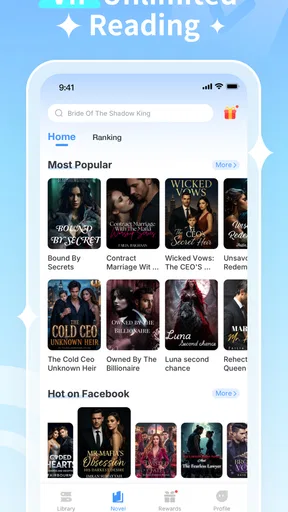
Upon launching TaleWave, you’re greeted with a visually appealing home screen that feels both inviting and intuitive. It's clear the developers put a lot of thought into the design, aiming for something that’s easy on the eyes and simple to navigate. The color scheme is warm and cozy, making you feel right at home as you dive into your first story.
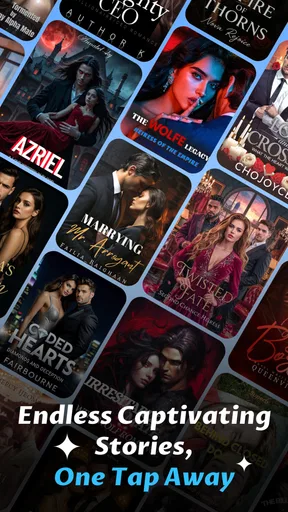
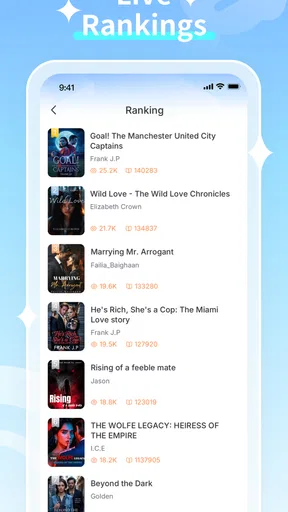
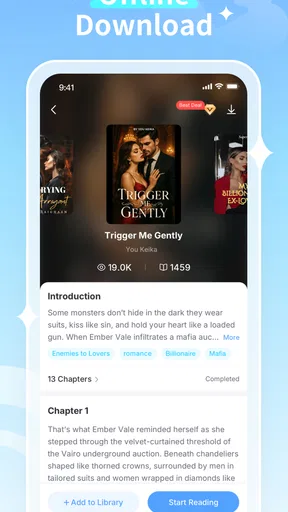
Navigation is a breeze. With a few taps, you can browse through a variety of genres—from mystery and fantasy to sci-fi and romance. Each story comes with a brief synopsis and a hint of what choices lie ahead. This setup makes it super easy to find something that piques your interest.
Storytelling and Interactivity
The core of TaleWave lies in its storytelling capabilities. The app offers a wide range of stories, each crafted with care and attention to detail. The narratives are engaging, with well-developed characters and plotlines that keep you hooked from start to finish. But what really sets it apart is the level of interactivity.
As you read, you’ll encounter choices that influence the direction of the story. This means no two experiences are the same, and you can revisit stories to explore different outcomes. It’s like having multiple books in one, and it keeps things fresh and exciting.
Customizability and User Experience
The app doesn’t just stop at providing great stories; it also lets you tailor the reading experience to your liking. You can adjust font sizes, switch between night and day modes, and even choose different backgrounds to suit your mood. It's these small touches that make a big difference, enhancing your reading pleasure.
Additionally, the app performs smoothly without any noticeable lags, even on older devices. This reliability is crucial for maintaining immersion, especially when you’re deep into an enthralling narrative.
Community and Updates
One of the standout features of TaleWave is its vibrant community. Users can submit their own stories, which means there’s always something new to discover. The app frequently updates its library, ensuring that content doesn’t become stale. This community-driven approach not only enriches the app but also fosters a sense of belonging among users.
Moreover, the developers are responsive and regularly implement user feedback, which is reflected in the app’s consistent improvements. It’s nice to see an app where the creators actively engage with their audience.
Final Thoughts
All in all, TaleWave is a delightful addition to any reader’s app collection. Its blend of storytelling, interactivity, and community involvement creates a unique experience that you’ll want to dive into again and again. Whether you’re a casual reader or a hardcore bibliophile, this app has something to offer.
So, if you’re looking to spice up your reading routine or just want to lose yourself in a world of interactive tales, give TaleWave a try. Trust me, you won’t be disappointed!
Pros
- User-friendly interface with intuitive navigation.
- Extensive library of stories across genres.
- Offline mode for reading on the go.
- Customizable font sizes and themes.
- Syncs across devices seamlessly.
Cons
- Limited free content; subscription required.
- Occasional app crashes reported.
- No audio narration available.
- In-app ads can be intrusive.
- Slow updates on new releases.
FAQs for TaleWave
What is TaleWave and what makes it unique?
TaleWave is an interactive storytelling app that combines user-generated content with immersive audio and visuals. Unlike other storytelling apps, TaleWave allows users to co-create stories with friends in real-time, offering a collaborative and dynamic narrative experience. Its unique blend of features, including voice modulation and customizable characters, sets it apart from traditional reading apps.
Is TaleWave suitable for all age groups?
Yes, TaleWave is designed to be family-friendly and offers content suitable for all age groups. The app includes a variety of stories ranging from children’s fairy tales to more complex narratives for adults. Parents can also use parental controls to manage content accessibility for younger users, ensuring a safe and enjoyable experience.
Does TaleWave require an internet connection to work?
TaleWave requires an internet connection for certain features, such as co-creating stories with friends and accessing the full library of content. However, users can download stories to their device for offline use, allowing them to enjoy their favorite tales without a constant internet connection, perfect for traveling or areas with limited connectivity.
What are the device requirements for installing TaleWave?
TaleWave is available for both Android and iOS devices. It requires Android version 8.0 or later and iOS 12.0 or later. The app is optimized for both smartphones and tablets, providing a seamless user experience across different devices. Ensure your device has sufficient storage space for downloads and updates.
Are there any in-app purchases or subscriptions in TaleWave?
TaleWave offers a free version with access to a limited selection of stories. For an enhanced experience, users can opt for a premium subscription that unlocks the full library, exclusive content, and additional features like advanced voice modulation. In-app purchases are available for individual stories and customization options.


